
The amount on the order
An exact-host archive preserves the earlier StarShare home and reseller offers. Current exact-domain prices were unavailable during this edition. Use the archive to identify a purchase or prepare a question about the product, then request the current bill before paying.
Ask the seller for the currency, full billed charge and expiry date in the same written offer before comparing the monthly equivalent.
What changes the value of this term?
No current connection conditions verified.
Will a customer on the older StarShare site keep access on the new route, and who is responsible for credit or payment issues during the move?
What the earlier provider site recorded
These amounts appeared in the supplied StarShare.app website release dated 8 November 2026. They are historical examples for identifying an offer. The current checkout terms need confirmation from the exact domain.
| Archived subscription term | Amount on the earlier site |
|---|---|
| 1 month | USD 6.99 |
| 3 months | USD 14.99 |
| 6 months | USD 27.99 |
| 12 months | USD 39.99 |
| Archived credit balance | Earlier pack total |
|---|---|
| 100 | USD 79.00 |
| 300 | USD 225.00 |
| 1,000 | USD 690.00 |
| 5,000 | USD 2,950.00 |
The archived schedule assigned one credit to one customer month and ten credits to a full year. The debit for intermediate periods still needs a named source.
StarShare’s archived order book and the ten-credit year
StarShare’s supplied .app release documents personal plans, four wholesale packs and an unusual annual deduction. Its STAR TV screenshots also preserve the look of the player. Those records answer several historical questions precisely. The present merchant, order conditions and any transfer from an older domain still require direct confirmation.
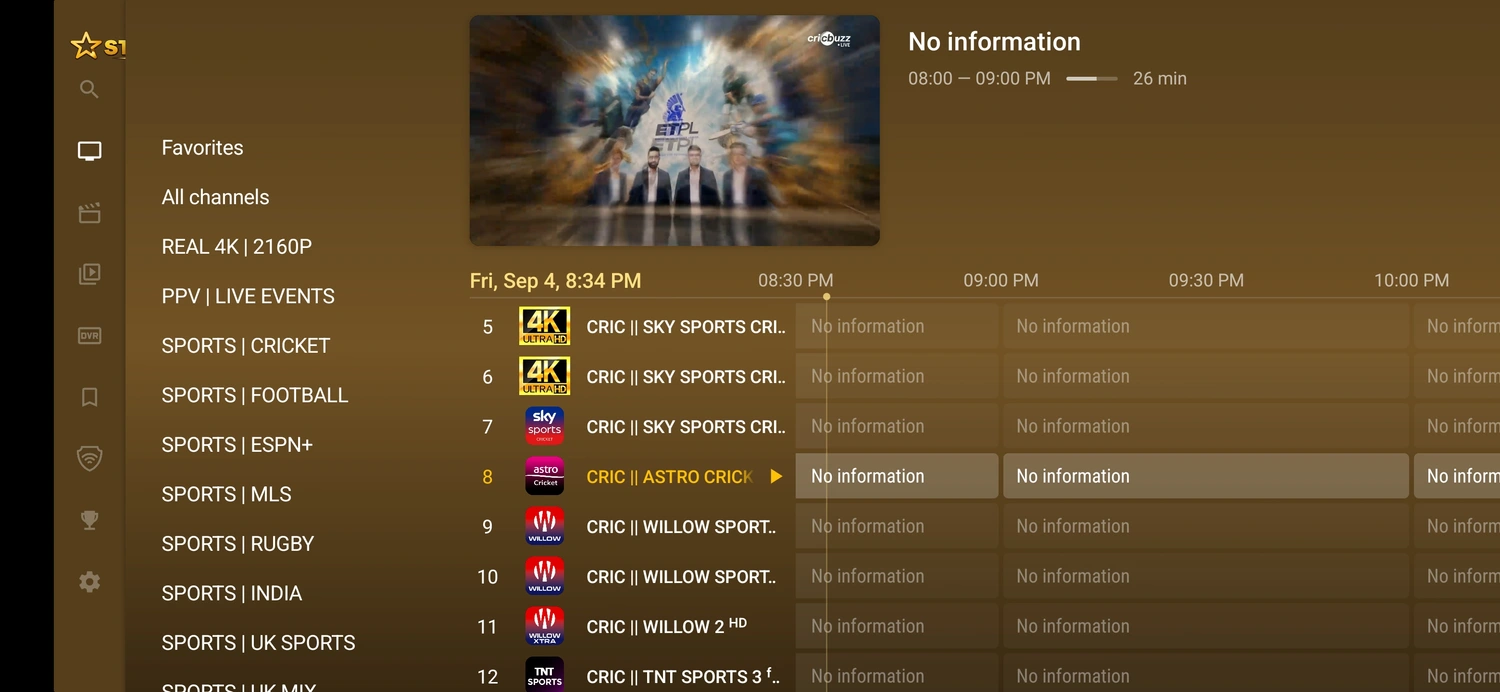
The gold STAR screen and the question of which app to install
The release documents a television-oriented interface labelled STAR TV and relates it to historical StarShare setup material. That is a real visual reference for a reader who recognises the old screen. The .app release also notes that the historical material contained two application packages with different identities. Its maintainers declined to designate one as the authoritative present download. The practical conclusion is simple: get the current publisher and supported installation source for your own device before acting on an old screenshot or filename.
This question is particularly important after replacing a television. If an old box still shows the gold logo but the new television’s store offers a similarly named app with a different publisher, pause the account setup and identify the intended product. Ask whether the supported route for the new television uses a different compatible player. If the answer involves another licence, find out who charges the fee and whether it applies on future replacement devices. A historically accurate screenshot can help explain the question without settling compatibility for a newer model.
A person reporting a successful move should record both models, the software publishers and whether the original service account continued. They need not post a private download link, device code or account details to make that report useful. A move might preserve the service term while requiring a new player activation. It might instead involve new credentials. Those outcomes look similar once a programme appears on screen, yet they carry different consequences at the next renewal.
When an old StarShare customer requests a renewal
The historical .io identity and the .app release can both appear in discussions about StarShare. A familiar name, the same contact route or the same screen does not establish that an old paid line or unspent reseller balance can migrate. Ask about the specific old order and device. Can the current seller identify the existing expiry and extend it? For a panel, can they see the current balance and explain whether it remains available? A reply identifying the old line and its actual remaining term is evidence a customer can use.
The .app terms in the archive were adapted on 7 November 2026 from a policy dated 30 August. They tie usage to the account period, method and connection allowance in the particular order, and separate third-party player charges. They also point to changes in catalogues and features. A buyer counting on two simultaneous screens, catch-up on one particular source or the continued availability of a preferred programme should ask about those items on the actual offer. The policy does not award an unlimited connection entitlement to everyone with a copy of the app.
The archived refund material describes an order-specific assessment and the possibility of troubleshooting. A useful private report therefore includes the receipt, term, device, app publisher and what happened when the customer attempted to play something. Redact logins, payment details and personal contact details from the public version. Another member can still learn that a particular model needed a different player or that a seller issued a correction. They do not need access to the account in order to learn from the outcome.
Read the screen gallery as a map of one documented interface
The archived gallery distinguishes a blank STAR TV television login, a category screen, channel browsing and a programme guide. There is also an app-selection view and a separate blank web-login reference. These images are useful because the screens are visibly different. An owner who says they cannot get past login may be looking at the television player, a browser sign-in or a selection panel. Ask which image their screen most closely resembles and what they pressed just before the error appeared. No private credentials are needed to narrow that down.
The documented guide screen, for example, tells readers there was a way to display programme information. It says less about a particular evening’s guide coverage. If a television lists a channel but shows no schedule, try another channel on the same player and note whether it has listings. If the schedule appears but the wrong programme is airing, give the time zone and programme name. Those observations identify a precise issue. The original guide image cannot validate current regional data, replay depth or support for a particular audio language.
The app-selection image can be equally useful after a replacement device is introduced. One owner may call the selection stage “my account” while another uses that phrase for the terminal television login. If purchases are also involved, a seller may be discussing the wholesale panel and the customer a retail player. Put the visible screen title or function in the support enquiry. Describe which device shows it. Phrase the issue as an action that failed, such as opening the channel grid after sign-in, rather than a conclusion that the customer account was cancelled.
The archived downloads guidance calls for a current source suited to the exact device and describes a one-day trial request. A dated installation file might keep an old system running but still be unsuitable for a new television or phone. The live listing, publisher name, operating system and account method together identify the supported route more convincingly than a remembered icon. If the seller offers a temporary test, confirm its end time and use the destination device. One day is generally too short to wait for the day itself and start investigating the hardware only afterwards.
File a useful account of an old order while the evidence is available
An owner comparing their recollection with the November release may find a different figure, an unfamiliar player or another hostname on a receipt. Preserve the difference. A “correction” that replaces the old merchant’s name with the current site title can destroy the very clue needed to trace the order. State the purchase month and year, currency, term, issuing domain and what can still be seen on the account. Identify a later change as a separate event. The result becomes a chronology another customer can follow.
For an unresolved refund, the November policy adaptation describes the need to contact support and gives circumstances that can affect eligibility after digital credentials have been issued or used. The current order may have different wording. Give support the original issue, device, steps already tried and the outcome sought, and retain the applicable response. In a public follow-up, separate a promise to investigate, an approved adjustment, and an amount actually returned. An extension of the subscription may solve the customer’s problem while producing a very different financial record.
For a panel owner, the same approach works with quantity. A 100-credit purchase, a visible 100-credit increase, an annual ten-credit debit and a resulting 90-credit balance together tell a useful story if those events occurred. A newly issued quote for the same pack is a different kind of evidence. State which one you have. A later pack that uses a different schedule would be a reason to put dates beside both records, especially if one customer still holds legacy credits. That is how an archive can keep helping readers long after a price card has changed.
Compare a shortened viewing season with a block of unused credits
The historical pricing makes a useful household case for a four-month sports season or a temporary work placement. One three-month term at $14.99 followed by one month at $6.99 would have totalled $21.98 if the same prices remained available for consecutive orders. The half-year was $27.99. The six-month option would therefore have cost $6.01 more for two additional months. Someone expecting to stay through a fifth month might have preferred the half-year, as a quarter and two separate months would have totalled $28.97. The exact end of a placement can be worth more than the phrase “lowest monthly rate.”
Compare that with a reseller trying to serve four months of customers. StarShare’s source gives no direct debit for three months, so the household’s “quarter plus month” comparison cannot simply be copied into the business account. If a customer genuinely opts for four consecutive monthly activations, the archive supports a forecast of four credits, assuming each is granted under the same rule. It does not establish that one four-month product exists, or that an operator can quietly substitute an equivalent schedule without changing the customer’s agreement.
A changed quote can be reported without treating the release as wrong. For example, if a seller now gives a quarterly debit, preserve the exact date, action, package and domain the quote covers. If that same deduction is later observed in the operator’s own panel, say so separately. One statement records a promise; the second records a transaction. If both support the same figure, the next reader gains a useful reference for a question the archived materials left open.
This distinction is most valuable at renewal. A customer whose term ends next week may simply need a seller who can identify and extend a working line. A person shopping from scratch may instead care about the new device setup, current app source and current bill. An old STAR TV screenshot can help the first customer explain what they already own. The direct quote and trial are more important for the second. Keeping both sources in view gives owners and newcomers a fairer basis for comparing experiences.
Put a date on the price before comparing it
An owner-supplied public website release contains a pricing page with the canonical StarShare.app address. Its files are dated 8 November 2026. The checkout route shown there was a WhatsApp enquiry, so the figures are advertised charges in an identifiable release. They are not evidence that a particular customer placed an order or that the same charges are still being accepted. The exact-host live pages could not be verified for this edition. A dated price card is more useful when it is kept with that distinction.
The archived household cards read $6.99 for one month, $14.99 for three, $27.99 for six and $39.99 for twelve. These are totals in US dollars. For an owner reconciling an old charge, the three-month figure is easy to get wrong because several similarly presented services advertise $16.99. The .app release here shows $14.99. When a new purchase is being discussed, ask the responding seller for the complete currency and amount again. If the quote differs, record both dates rather than silently rewriting the old offer.
At the archived figures, two quarters add up to $29.98, or $1.99 more than a half-year. Two half-years add up to $55.98, or $15.99 more than an annual term. That makes the annual choice look attractive for a settled household with a working television player. For someone spending only three months at an address, $14.99 was less than half the annual commitment. A comparison that starts with the period the household will actually use brings a different perspective from one that begins with the lowest monthly average.
Provider material for this report
- Owner-supplied .app household offer in the 8 November 2026 release
- Owner-supplied wholesale pack schedule, 8 November release
- Archived monthly and annual debit rules
- Archived STAR TV interface and package identity evidence
- Terms adaptation dated 7 November 2026 in the owner release
- Refund policy supplied with the November release
- Archived browser-prepared WhatsApp enquiry with no automatic submission
- Archived device-source confirmation and trial route
- Archived player, programme guide and app-selection references
- Archived scope distinctions for distribution enquiries
Planning a viewing window with StarShare
A dated price on an earlier starshare.app page can help identify the product a seller means. A new order still needs an exact amount, a currency, an expiry date and a named billing party. Record the reply against this domain before treating an earlier figure as a budget. A comparison with complete prices on the other side can establish what that other offer costs, while the missing side stays open.
How the 1-month order compares
Read each row as an alternative for this exact duration. Currency and market are shown because they affect eligibility and the amount that reaches your statement. A missing figure means the provider still needs to identify a current offer for that period.
| Alternative provider | Listed market | 1-month total | Relative to this offer |
|---|---|---|---|
| 5G Live | Ask the seller | Current bill unconfirmed | Compare eligibility and currency on the order |
| Rynex Play | Ask the seller | Current bill unconfirmed | Compare eligibility and currency on the order |
| 4K IPTV | EUR listing | EUR 6.99 | Compare eligibility and currency on the order |
| 4K OTT Pro Max | USD listing | USD 9.99 | Compare eligibility and currency on the order |
| 8K IPTV | USD listing | USD 9.99 | Compare eligibility and currency on the order |
| 8K PRO IPTV | USD listing | USD 9.99 | Compare eligibility and currency on the order |
| B1G IPTV | USD listing | USD 7.99 | Compare eligibility and currency on the order |
| Crystal IPTV | EUR listing | EUR 11.99 | Compare eligibility and currency on the order |
| Dino IPTV | USD listing | USD 8.99 | Compare eligibility and currency on the order |
| Dream 4K IPTV | USD listing | USD 8.99 | Compare eligibility and currency on the order |
| Golden OTT | USD listing | USD 8.99 | Compare eligibility and currency on the order |
| Hello Sky IPTV | USD listing | USD 7.99 | Compare eligibility and currency on the order |
| Hot IPTV | USD listing | USD 11.99 | Compare eligibility and currency on the order |
| IPTV Australia | Australia | AUD 11.99 | Compare eligibility and currency on the order |
| IPTV Canada | Canada | CAD 13.99 | Compare eligibility and currency on the order |
| IPTV Europe | Europe | EUR 8.99 | Compare eligibility and currency on the order |
| IPTV USA | United States | Current bill unconfirmed | Compare eligibility and currency on the order |
| Lion OTT | USD listing | USD 7.99 | Compare eligibility and currency on the order |
| MegaOTT.app | USD listing | USD 6.99 | Compare eligibility and currency on the order |
| MegaOTT.io | USD listing | USD 6.99 | Compare eligibility and currency on the order |
| Pro Max 4K OTT | USD listing | USD 9.99 | Compare eligibility and currency on the order |
| Sky Glass IPTV | UK | GBP 6.00 | Compare eligibility and currency on the order |
| Smarter 8K IPTV | USD listing | USD 11.99 | Compare eligibility and currency on the order |
| Strong 8K IPTV | USD listing | USD 9.99 | Compare eligibility and currency on the order |
| Team 8K | USD listing | USD 9.59 | Compare eligibility and currency on the order |
| Trex IPTV | USD listing | USD 9.99 | Compare eligibility and currency on the order |
| UKIPTV | UK | GBP 7.49 | Compare eligibility and currency on the order |
| Ultra 8K IPTV | USD listing | USD 9.59 | Compare eligibility and currency on the order |
| XOTT | USD listing | USD 9.59 | Compare eligibility and currency on the order |
Three alternatives worth reading in detail
5G Live compared with StarShare
5G Live publishes a USD 44.99 year and a clear monthly debit for reseller accounts. Owners of an older subscription face a second question before paying. Which seller has access to the line already on their screen?
One day with the player you will keep
The exact-domain provider’s trial page invites prospective customers to install a compatible player, then request a one-day free trial by WhatsApp at +44 7532 814802. The order is worth noticing. If you ask for the trial when you are still comparing televisions, part of a short viewing window could pass while you try to find an app that will open. Identify the model and software, install the intended player from the appropriate source, and wait until you have an evening free to request access. Confirm the actual start and end time when the account arrives.
Spend the first part on the ordinary routine. Open the programme guide, find one channel you would want on an average Tuesday and switch between that and a second one. If a household member needs captions or a particular language, choose one known programme for which the original broadcaster describes those options. Ask that person to operate the remote. Someone who has the menus memorised can make an awkward process look quite simple. A buyer is trying to learn whether their own household can repeat the routine without help.
Reserve part of the day for coming back to the app. Leave a film or programme, switch to another television input, and reopen it later. Check whether the player retained the account and the preferred options. A short test that opens correctly once is useful evidence of a successful sign-in but gives little indication of the next evening's experience. Record what the trial can establish. A day of successful playback on one television says nothing decisive about the reliability of an account over a whole year or about the line-up after an event’s rights change.
Which of the four app screens is in front of you?
The 5G Live app directory illustrates 5G Next, 5G Play, the 5G Live app and VAR Player. The names are close enough that a family member following a message over the phone can open the wrong one in good faith. Begin by comparing the display name and login screen against the provider's page for that edition. The published 5G Play screen requests a service code as well as user and password. The archived 5G Live screen instead shows a choice of portals. Those differences give the person helping you a useful clue before anyone changes a password.
VAR Player has its own App Store listing. The provider's guide identifies the store listing and explains that the player itself does not supply a channel bundle. A person who has installed it on an Apple device has acquired an application capable of opening appropriate content. They still need account details for the service they purchased. The shop issuing a player receipt and the seller issuing a viewing term can be different. Preserve both names. They lead to different support contacts when one payment has gone through and the other account is still waiting for activation.
The 5G name in an app is a brand identification. It supplies no information about the cellular connection currently serving a phone or about the speed the television is receiving over Wi-Fi. A buyer who wants to watch at home should judge the player on the television and home network they intend to use. Someone intending to use it away from home needs the account issuer's answer about that location and their mobile operator's information about data allowances. Neither question is answered by the letters printed on the app icon.
When a working app outlasts the account
A year after installation the familiar home screen may still open even though the customer can no longer play a stream. First read the date on the original service confirmation. Then look at whether the player displays an account, an expiry or a device-activation prompt. These pieces can point in different directions. A successful app launch is evidence that the television can still run it. An active player licence and an active viewing subscription are two separate records. A customer who knows which one expired has a much better chance of paying the right party.
A seller offering an extension can be asked to reproduce the existing expiry privately before it is changed. Confirm whether renewing early will add time to that date and whether the same player configuration, favourites and guide groups will remain usable. A seller who instead creates a new account may need to explain which settings the player stores locally and which the customer must recreate. For a family whose relative relies on a short list of favourite channels, rebuilding that list is part of the cost of changing accounts.
The current .app refund page directs customers to confirm the window, eligibility and process for their transaction. It does not publish an automatic refund deadline. Preserve the amount, date and issuer and record the moment a private support request was sent. Where the account came through a reseller, start with that order and its terms. A person reading about your case can learn considerably more from an accurate chronology of purchase, activation and contact than from an assertion that every 5G-branded product must honour the same arrangement.
A purchase enquiry for the exact app domain
The exact-domain 5glive.app website edition dated 7 November gives Unconfirmed, Unconfirmed, Unconfirmed and Unconfirmed as full charges in US dollars. A separate listing published on 13 November records the same schedule. The account allowance remains subject to confirmation. The provider’s pages prepare an enquiry, so obtain the date, eligible screens, recipient and total for the actual order before paying. A term total is a useful starting point even when a returning customer still needs the issuer to identify an old line.
If you already have a compatible television, the quote should still name the player edition. An app icon can survive a change of software publisher, device generation or subscription supplier. On an existing installation, note the display name and version from the application's information screen. Confirm whether the existing account can be renewed on that installation or whether support proposes a new service with a new identifier. Replacing an account and extending one are different outcomes for a household with saved favourites.
Rynex Play compared with StarShare
The supplied RynexPlay.app release gives the four household totals, a monthly reseller unit and a support contact on rynex.tv. It is a valuable dated record for owners. A fresh quote is still needed to establish what a buyer can order on the .app domain now.
A trial and refund in the original terms
The archived terms discuss a 24-hour trial and point purchasers to a separate refund policy assessed for eligibility. For a current buyer, ask whether the trial is available, when its clock starts and whether its account conditions match the planned paid line. A busy weekday trial that expires before a household can watch may settle very little. Arrange the timing around something you actually use, such as a regional guide, an audio language or a programme on the television in the main room.
Keep the trial address separate from the public discussion. If something fails, publish the device, player, time and visible problem while removing credentials. For a private support investigation retain the exact order reference and the action attempted. If the question is an old Rynex purchase, identify it as such. A response saying another party can sell a new annual term is still useful, but it is materially different from a response that locates your old account and honours the remaining months.
How to conduct a useful twenty-four hours on this particular player
The original RynexPlay trial instructions ask for the country, device model and preferred player. They describe capacity and eligibility as variables. That is an important qualification if someone paid for an annual account after hearing that “everyone gets a day free.” A request, an approved trial and a tested account are three separate events. For readers comparing trials, state which of those you reached and when. A waiting period before credentials arrive can be frustrating, but it does not by itself establish that a running test account failed.
Set aside part of the available time for a sequence that crosses the player’s different sections. Try finding a live programme from the guide, an on-demand film from search and an episode inside a series. A working live list does not demonstrate that search can distinguish between two titles with the same name, or that a subtitle setting stays selected when the next episode begins. The archived interface gives a buyer reasons to try all three paths. A pass on one is useful evidence even if another path never becomes available during the trial.
The original app page gives a helpful clue about an empty guide. Guide data varies with the source and the player, and the guidance suggests checking the time zone and any refresh control the player provides. Start by comparing two channels in the same session. If one shows programme names and another has none, record which was which. If both guides are present but every entry is an hour out, note the device time zone and a named programme. These are distinct reports. One is about missing data and the other is about interpreting the clock.
For somebody buying mainly to watch programmes later, open one named item from yesterday, as well as one currently airing. The source describes catch-up as dependent on the account method and the relevant channel. Two channels that look identical in the live list may offer different replay privileges or history. Ask the seller what to expect for the one that matters, and test it during the allotted window. A review that says “yesterday’s evening bulletin opened on this model” describes a check another viewer can repeat. A blanket claim that every programme has catch-up goes well beyond the evidence.
Inside the August release
The source of the figures on this page is an owner-supplied RynexPlay.app website archive. Its pricing and reseller files both carry 29 August 2026 timestamps. Their canonical links point to the .app domain. That makes them more useful than a copied logo or an undated forum post. The figures can be attributed to a named release and to a precise page. They have not been confirmed against a presently retrievable checkout on that hostname. Anyone renewing from an older receipt should ask what the current seller will honour.
The relationship with Rynex.tv is more specific than a resemblance between names. The archived .app homepage describes Rynex Play and Rynex TV together, and the .app pricing, terms and reseller pages direct support enquiries to an address on rynex.tv. A separate Rynex.tv listing also uses RynexPlay as a player name. This supports a documented connection in the archived material. It still leaves a practical question for a customer: will the current support team find the exact account or panel you already own, and can it extend the remaining time or balance?
To answer that, start with the domain on the old order and the line’s present expiry. A private support reply that recognises the order and gives an exact proposed new expiry is evidence about that particular renewal. A branded player that accepts newly issued credentials answers a different question. The buyer may now have a new line. Keep those outcomes distinct when reporting the result, especially if moving between a .tv and a .app link.
The archive uses one name for more than one part of the purchase
Rynex’s own material uses the player and service names very closely. A member asking “where can I get Rynex Play?” might be asking where to find an app, where to obtain a working viewing account or where to retrieve a previous order. Once those possibilities are separated, the answer becomes much shorter. For the app, identify the device, local app store and publisher. For viewing access, identify the exact service address and seller’s quote. For an old order, give the private support contact the original date and reference.
A phone used to arrange an account is not always the device that will play it. The person helping a relative might have installed a player on an Android phone while the real destination is a television that runs a different operating system. Rynex’s archived guidance covers a number of platforms but qualifies the route by model and availability. Ask for the route for the relative’s actual television while both have time to follow it. Keep the phone's successful login as a separate observation if it helps diagnose a problem later.
Watch what happens if the player is reset or replaced. Guide data and favourites might be held by the software or might follow an account, depending on the actual setup. Before changing devices, make a private note of the favourite channels by name and the order in which the household finds them. Ask what the recommended player preserves. The presence of a favourites control in archived material says the interface had such a feature; it cannot predict whether those choices survive a different software installation years or devices later.
A screen that says the account is active while a payment reminder arrives deserves a careful reply. Some reminders concern the app, others the viewing line, and a reseller may also receive separate notices about a panel. Identify the issuer and the product before making a new payment. The old release linked a .tv support address to a .app site, but an address printed in a past document is a historical contact. A current order acknowledgment identifying the particular paid item is better evidence of who is handling it now.
4K IPTV compared with StarShare
The numbers on 4kiptv.app are unusually usable. Its consumer prices cover a complete term, its reseller credits buy customer-months, and its one-day trial starts with an installed player. Picture quality, extra screens and the handling of a failed activation still need an answer for the particular order.
Following the bill after a player has been uninstalled
The provider’s support material makes a distinction that regularly matters on a family account. The household might pay the service seller in euros and separately authorise a software charge with a player publisher or app store. Deleting the player removes it from sight; it may leave a store subscription active under the account that bought it. A household hoping to stop a charge should identify the merchant on the payment record, locate the corresponding account and check the cancellation or renewal status there. The billing route for the software is independent of the four-term 4K IPTV price table.
Consider the parent who ordered the service and the adult child who set up the player under their own store account. The parent may have the viewing order and all the information needed to extend it. The child may be the only one able to see a software charge or cancel its recurrence in the store. The arrangement works until the television is replaced or a renewal arrives unexpectedly. Keep the purchaser and the issuer visible on both records without exchanging passwords. There is no need to post either account’s sign-in details to establish which receipt applies.
The same separation helps with a duplicate payment allegation. Two small charges on the same day might be genuinely duplicate payments to one seller or two legitimate charges to two different parties. Identify the currency, amount, biller and product on each. If both payments point to the same 4K IPTV order, take the two references to the contact handling that order. If they point to different products, ask each seller what it supplied. A precise chronology is a better first move than disputing everything associated with the television at once.
Start with the screen you intend to watch
A living-room television makes a poor stand-in for the small screen on which people often buy a subscription. The first is operated from across the room, usually with a basic remote. The second has a keyboard, a browser and a different network connection. If a trial opens on the phone, one question has been answered. The useful question for a household buying this particular service is whether the same account can be set up on the television and used comfortably at the hour people normally watch.
4K IPTV puts that sequence in its trial instructions. Find an appropriate player for the exact device, install it, give support the model and app name, and ask for the advertised one-day trial. The FAQ asks buyers to confirm eligibility and the actual expiry. That detail matters if the intended viewing is on Friday evening and the enquiry is sent on Thursday morning. Ask for the start and end in a named time zone. A trial running while you are at work leaves very little evidence on which to choose a year.
Pick two things the household would actually miss. It might be a particular regional bulletin and a series for which subtitles are essential. Open them from the normal menu, move to another channel, and go back. Try opening tomorrow’s programme guide with the remote. If an item cannot be found, ask for the precise category and title. The resulting answer can be checked while access remains active. A gallery image or a reference to a streaming brand on the provider’s site does not tell you whether a particular title is supplied on your account.
Home viewing, paid software and the second screen
The FAQ explicitly asks households to confirm simultaneous streams for the actual account. This is worth more than a broad compatibility list. Two televisions may each run a supported player, yet the account bought for the living room may allow only one active session. A family planning to watch different programmes together should have the seller price that exact arrangement. Give the two device models and describe simultaneous use in plain language. Two installations or two profiles inside an app might still be connected to one viewing entitlement.
A paid player introduces a second purchase decision. Some players have their own activation arrangements. Ask the app publisher how device changes are handled and the service seller how an account login is replaced. If an old streaming box is retired, one answer may concern moving a software licence and the other may concern credentials and allowed devices. A renewal quote that refers only to service access settles neither question about the software. Keep each receipt with the name of the party that issued it.
For a household with accessibility requirements, describe the exact feature being evaluated. Subtitle availability in one on-demand title and the ability to enlarge the player’s guide text are different capabilities. A platform might provide the second while the selected programme offers no appropriate subtitle track. Try the preferred language, audio or remote control on one named example and write down the result. A report with a reproducible observation gives the next person far more to go on than a full-page list of platform logos.
The first wholesale recharge should answer two separate questions
The reseller page explicitly distinguishes taking payment from applying the credits. Plan a top-up so that those events can be reconciled without customer pressure. Suppose a desk has 17 credits, pays for the 100-credit Starter pack, and is also handling a three-month extension. If the extension goes through before the pack lands, the balance might show 14 before reaching 114. If the pack arrives first, it might show 117 before dropping to 114. The final number is the same. The two transaction references show which action actually occurred first.
This matters if a staff member sees 14 and assumes the purchase has failed, or sees 117 and assumes both operations have finished. Match the amount paid, the nominal pack quantity and the line extension independently. If the support team can locate the funding transaction but the line still has its old expiry, that is now a defined customer-account problem. If the line has the new expiry but the top-up is missing, report an inventory purchase discrepancy. Neither case requires guessing whether the published unit price changed.
For a shop trading across currencies, preserve the original euro amount alongside the local bank debit. A €276.50 Professional order buys the published 350 customer-months. The acquiring bank’s converted total changes the reseller’s real cost in its own books, while the nominal credit quantity should still match the package. A retail sale billed in the shop’s local currency introduces a further exchange-rate decision. Tracking those amounts separately prevents an operator from promising a retail margin based only on a headline of €0.79 per customer-month.
One last distinction is the gap between receiving an enquiry and accepting a binding order. The site’s contact page asks buyers to establish the contracting operator and order conditions in writing and offers no fixed response time. A prospective reseller with a waiting list should therefore confirm the panel has been funded and customers can be provisioned before promising a particular start hour. A household choosing the one-day trial has the parallel concern: the advertised duration becomes useful for that evening only when the seller has confirmed the start and the account actually works on the intended device.